1. Log in to your cPanel account.
2. In the Domains section, click on Redirects.
3. Scroll down to the end of the page. Under Current Redirects, locate the domain and click on remove.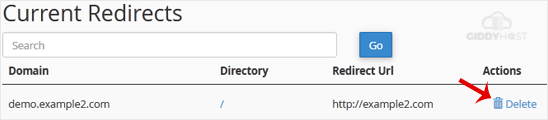
4. For confirmation, click on Remove Redirect once more.

1. Log in to your cPanel account.
2. In the Domains section, click on Redirects.
3. Scroll down to the end of the page. Under Current Redirects, locate the domain and click on remove.
4. For confirmation, click on Remove Redirect once more.
Registering a domain with StellerHost is simple and instant. What is a domain name? A domain is...
A premium domain name is a high-quality domain that is often bought and sold for profit. These...
This guide walks you through transferring a domain from GoDaddy to StellerHost. Follow these...
This guide provides step-by-step instructions for transferring a domain from Network Solutions to...
This guide outlines the step-by-step process for transferring your domain from Register.com to...